AMDGPU Ring Timeout / Minecraft workaround using Mesa Zink

As you can tell from my previous post on the AMD Ring Timeout, Mesa has some bug regression they are working out. There was a lot of settings I had gone through and many are not necessary.
I have the following AMD hardware
$ inxi -Fxxc0z
System:
  Kernel: 6.16.8-arch3-1 arch: x86_64 bits: 64 compiler: gcc v: 15.2.1
  Desktop: KDE Plasma v: 6.4.5 tk: Qt v: N/A wm: kwin_wayland dm: SDDM
    Distro: EndeavourOS base: Arch Linux
Machine:
  Type: Desktop System: ASUS product: N/A v: N/A serial: <superuser required>
  Mobo: ASUSTeK model: PRIME Z690M-PLUS D4 v: Rev 1.xx
    serial: <superuser required> part-nu: SKU UEFI: American Megatrends v: 3801
    date: 05/14/2025
Battery:
  Device-1: hidpp_battery_0 model: Logitech M720 Triathlon Multi-Device Mouse
    serial: <filter> charge: 55% (should be ignored) status: discharging
CPU:
  Info: 6-core model: 12th Gen Intel Core i5-12400F bits: 64 type: MT MCP
    arch: Alder Lake rev: 5 cache: L1: 480 KiB L2: 7.5 MiB L3: 18 MiB
  Speed (MHz): avg: 801 min/max: 800/5600 cores: 1: 801 2: 801 3: 801 4: 801
    5: 801 6: 801 7: 801 8: 801 9: 801 10: 801 11: 801 12: 801 bogomips: 59904
  Flags-basic: avx avx2 ht lm nx pae sse sse2 sse3 sse4_1 sse4_2 ssse3 vmx
Graphics:
  Device-1: Advanced Micro Devices [AMD/ATI] Navi 22 [Radeon RX 6700/6700
    XT/6750 XT / 6800M/6850M XT] vendor: XFX driver: amdgpu v: kernel
    arch: RDNA-2 pcie: speed: 16 GT/s lanes: 16 ports: active: DP-3,HDMI-A-1
    empty: DP-1,DP-2,Writeback-1 bus-ID: 03:00.0 chip-ID: 1002:73df
  Device-2: Microdia USB Live camera driver: snd-usb-audio,uvcvideo
    type: USB rev: 2.0 speed: 480 Mb/s lanes: 1 bus-ID: 1-6:3 chip-ID: 0c45:636b
  Display: wayland server: X.org v: 1.21.1.18 with: Xwayland v: 24.1.8
    compositor: kwin_wayland driver: X: loaded: amdgpu
    unloaded: modesetting,radeon alternate: fbdev,vesa dri: radeonsi
    gpu: amdgpu d-rect: 7680x2160 display-ID: 0
  Monitor-1: DP-3 pos: primary,left model: Dell S3221QS res: 3840x2160
    hz: 60 dpi: 139 diag: 806mm (31.7")
  Monitor-2: HDMI-A-1 pos: right model: LG (GoldStar) Ultra HD
    res: 3840x2160 hz: 60 dpi: 163 diag: 690mm (27.2")
  API: EGL v: 1.5 platforms: device: 0 drv: radeonsi device: 1 drv: swrast
    gbm: drv: kms_swrast surfaceless: drv: radeonsi wayland: drv: radeonsi x11:
    drv: radeonsi
  API: OpenGL v: 4.6 compat-v: 4.5 vendor: amd mesa v: 25.2.3-arch1.2
    glx-v: 1.4 direct-render: yes renderer: AMD Radeon RX 6700 (radeonsi navi22
    LLVM 20.1.8 DRM 3.64 6.16.8-arch3-1) device-ID: 1002:73df display-ID: :1.0
  API: Vulkan v: 1.4.321 surfaces: N/A device: 0 type: discrete-gpu
    driver: mesa radv device-ID: 1002:73df
  Info: Tools: api: clinfo, eglinfo, glxinfo, vulkaninfo
    de: kscreen-console,kscreen-doctor wl: wayland-info
    x11: xdpyinfo, xprop, xrandr
You do not need to change any kernel parameters at all. I did a clean install of EndeavourOS and installed the following packages and launch using the zink driver for Mesa
$ sudo pacman jdk-openjdk yay mesa vulkan-radeon vulkan-tools qt5-svg qt5-base
$ yay multimc
$ java -version
openjdk version "25.0.1" 2025-09-16
OpenJDK Runtime Environment (build 25.0.1)
OpenJDK 64-Bit Server VM (build 25.0.1, mixed mode, sharing)
$ MESA_LOADER_DRIVER_OVERRIDE=zink multimc
What I believe is happening underneath is Minecraft is making OpenGL calls and this is going through the Zink driver and translating them to Vulkan calls. It works and doesn't crash. I go to video setting in minecraft, turn off vsync and set my frames to about what my monitor refresh rate is and is is smooth as butter.
I have also installed Optifine (which is a bit of PITA with MultiMC so read the docs) and put Solas shaders with the game.
Update 10/2/25 - So fix for Minecraft is simpler and made a separate post. There was an update to Mesa and successfully ran vkmark
[acefour@acefour-2 ~]$ vkmark
=======================================================
    vkmark 2025.01
=======================================================
    Vendor ID:      0x1002
    Device ID:      0x73DF
    Device Name:    AMD Radeon RX 6700 (RADV NAVI22)
    Driver Version: 104865796
    Device UUID:    80b0907ec2d37b93becd8b7531372d8c
=======================================================
[vertex] device-local=true: FPS: 33327 FrameTime: 0.030 ms
[vertex] device-local=false: FPS: 26739 FrameTime: 0.037 ms
[texture] anisotropy=0: FPS: 32967 FrameTime: 0.030 ms
[texture] anisotropy=16: FPS: 33517 FrameTime: 0.030 ms
[shading] shading=gouraud: FPS: 33864 FrameTime: 0.030 ms
[shading] shading=blinn-phong-inf: FPS: 33893 FrameTime: 0.030 ms
[shading] shading=phong: FPS: 33900 FrameTime: 0.029 ms
[shading] shading=cel: FPS: 33723 FrameTime: 0.030 ms
[effect2d] kernel=edge: FPS: 34083 FrameTime: 0.029 ms
[effect2d] kernel=blur: FPS: 24878 FrameTime: 0.040 ms
[desktop] <default>: FPS: 30047 FrameTime: 0.033 ms
[cube] <default>: FPS: 33975 FrameTime: 0.029 ms
[clear] <default>: FPS: 30716 FrameTime: 0.033 ms
=======================================================
                                   vkmark Score: 31971
=======================================================
[acefour@acefour-2 ~]$ inxi -Fxxc0z
System:
  Kernel: 6.16.8-arch3-1 arch: x86_64 bits: 64 compiler: gcc v: 15.2.1
  Desktop: KDE Plasma v: 6.4.5 tk: Qt v: N/A wm: kwin_wayland dm: SDDM
    Distro: EndeavourOS base: Arch Linux
Machine:
  Type: Desktop System: ASUS product: N/A v: N/A serial: <superuser required>
  Mobo: ASUSTeK model: PRIME Z690M-PLUS D4 v: Rev 1.xx
    serial: <superuser required> part-nu: SKU UEFI: American Megatrends v: 3801
    date: 05/14/2025
Battery:
  Device-1: hidpp_battery_0 model: Logitech M720 Triathlon Multi-Device Mouse
    serial: <filter> charge: 55% (should be ignored) status: discharging
CPU:
  Info: 6-core model: 12th Gen Intel Core i5-12400F bits: 64 type: MT MCP
    arch: Alder Lake rev: 5 cache: L1: 480 KiB L2: 7.5 MiB L3: 18 MiB
  Speed (MHz): avg: 800 min/max: 800/5600 cores: 1: 800 2: 800 3: 800 4: 800
    5: 800 6: 800 7: 800 8: 800 9: 800 10: 800 11: 800 12: 800 bogomips: 59904
  Flags-basic: avx avx2 ht lm nx pae sse sse2 sse3 sse4_1 sse4_2 ssse3 vmx
Graphics:
  Device-1: Advanced Micro Devices [AMD/ATI] Navi 22 [Radeon RX 6700/6700
    XT/6750 XT / 6800M/6850M XT] vendor: XFX driver: amdgpu v: kernel
    arch: RDNA-2 pcie: speed: 16 GT/s lanes: 16 ports: active: DP-3,HDMI-A-1
    empty: DP-1,DP-2,Writeback-1 bus-ID: 03:00.0 chip-ID: 1002:73df
  Device-2: Microdia USB Live camera driver: snd-usb-audio,uvcvideo
    type: USB rev: 2.0 speed: 480 Mb/s lanes: 1 bus-ID: 1-6:3 chip-ID: 0c45:636b
  Display: wayland server: X.org v: 1.21.1.18 with: Xwayland v: 24.1.8
    compositor: kwin_wayland driver: X: loaded: amdgpu
    unloaded: modesetting,radeon alternate: fbdev,vesa dri: radeonsi
    gpu: amdgpu d-rect: 7680x2160 display-ID: 0
  Monitor-1: DP-3 pos: primary,left model: Dell S3221QS res: 3840x2160
    hz: 60 dpi: 139 diag: 806mm (31.7")
  Monitor-2: HDMI-A-1 pos: right model: LG (GoldStar) Ultra HD
    res: 3840x2160 hz: 60 dpi: 163 diag: 690mm (27.2")
  API: EGL v: 1.5 platforms: device: 0 drv: radeonsi device: 1 drv: swrast
    gbm: drv: kms_swrast surfaceless: drv: radeonsi wayland: drv: radeonsi x11:
    drv: radeonsi
  API: OpenGL v: 4.6 compat-v: 4.5 vendor: amd mesa v: 25.2.4-arch1.1
    glx-v: 1.4 direct-render: yes renderer: AMD Radeon RX 6700 (radeonsi navi22
    LLVM 20.1.8 DRM 3.64 6.16.8-arch3-1) device-ID: 1002:73df display-ID: :1.0
  API: Vulkan v: 1.4.321 surfaces: N/A device: 0 type: discrete-gpu
    driver: mesa radv device-ID: 1002:73df
  Info: Tools: api: clinfo, eglinfo, glxinfo, vulkaninfo
    de: kscreen-console,kscreen-doctor wl: wayland-info
    x11: xdpyinfo, xprop, xrandr
Audio:
  Device-1: Intel Alder Lake-S HD Audio vendor: ASUSTeK driver: snd_hda_intel
    v: kernel bus-ID: 00:1f.3 chip-ID: 8086:7ad0
  Device-2: Advanced Micro Devices [AMD/ATI] Navi 21/23 HDMI/DP Audio
    driver: snd_hda_intel v: kernel pcie: speed: 16 GT/s lanes: 16
    bus-ID: 03:00.1 chip-ID: 1002:ab28
  Device-3: Microdia USB Live camera driver: snd-usb-audio,uvcvideo
    type: USB rev: 2.0 speed: 480 Mb/s lanes: 1 bus-ID: 1-6:3 chip-ID: 0c45:636b
  API: ALSA v: k6.16.8-arch3-1 status: kernel-api
  Server-1: PipeWire v: 1.4.8 status: active with: 1: pipewire-pulse
    status: active 2: wireplumber status: active 3: pipewire-alsa type: plugin
    4: pw-jack type: plugin
Sensors:
  System Temperatures: cpu: 44.0 C mobo: N/A gpu: amdgpu temp: 50.0 C
    mem: 48.0 C
  Fan Speeds (rpm): N/A gpu: amdgpu fan: 623
Info:
  Memory: total: 64 GiB available: 62.6 GiB used: 19.99 GiB (31.9%)
  Processes: 546 Power: uptime: 2h 52m wakeups: 0 Init: systemd v: 258
    default: graphical
  Packages: pm: pacman pkgs: 1179 Compilers: gcc: 15.2.1 Shell: Bash
    v: 5.3.3 running-in: konsole inxi: 3.3.39
Update 10/2
Well now I got Brave Browser to produce a ring timeout. Details can be found at https://gitlab.freedesktop.org/mesa/mesa/-/issues/14030
Update 11/14
Did a system update before I went and tried Cosmic DE. Under Cosmic I can play both vanilla minecraft and multimc w/shaders on 4k without the zink trick. Firefox and Brave both have tearing issues with WebGL2. Seems chromium derived browsers can fix this via
alias brave='brave --password-store=kwallet6 --ozone-platform=wayland --use-angle=vulkan --enable-features=Vulkan,VulkanFromANGLE,DefaultANGLEVulkan &'
Cosmic does experience screen tearing if you open the Cosmic terminal full screen. Not sure why but I tried Ghostty and it did not experience tearing.
Seems like there is some issue with Plasma. Both monitors have AMD Freesync
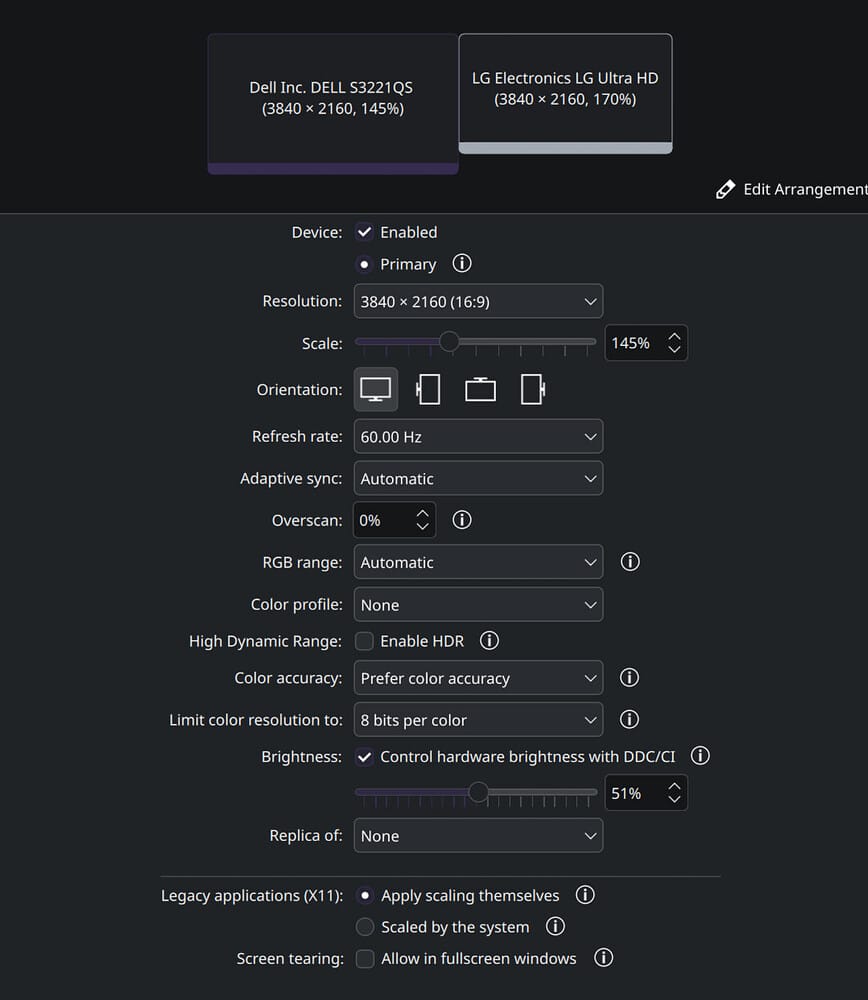
Turning on "Allow in fullscreen windows" does not make a difference in Plasma for screen tearing with Minecraft.
Going to fire up Hyprland and see what happens there next . . .
Update: Hyprland vanilla Minecraft after going into a game immediately starts tearing and the minecraft-launcher core dumps and locks up the screen. At lease amdgpu isn't doing a ring timeout, which is nice. I guess.
In short, nothing seems entirely stable. Cosmic has better results then Plasma for running Minecraft. Ghostty doesn't tear fullscreen on Cosmic but Cosmic terminal does. WebGL2 is an issue for both Chromium-based browsers and Firefox. There is mitigation for Chromium-based browsers.
Conclusion:
Using Cosmic DE, MultiMC w/Forge, Iris and Sodium and using a stunning shader pack Solas I can make it work. Cosmic does not seem to exhibit the same bug as Plasma. I don't need to use Zink solution and I get 60fps if I drop my resolution on my Freesync 4k 60hz monitor to 1440x900. I do not have VSync turned on in Minecraft Video Settings. There isn't any tearing.
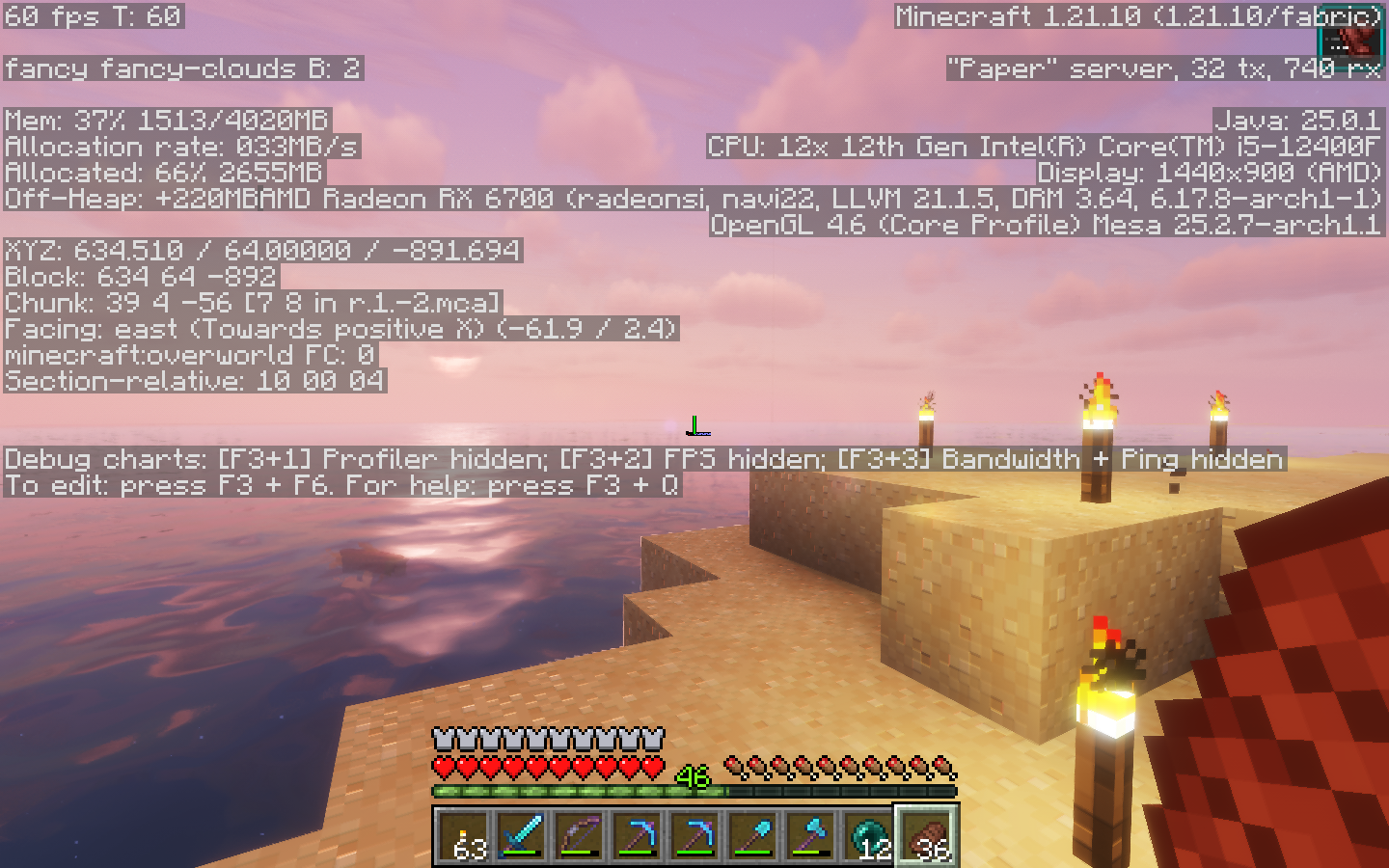
Cosmic Terminal does have tearing but I mainly use Ghostty so problem resolved.
Current settings
$ inxi -Fxxc0z
System:
  Kernel: 6.17.8-arch1-1 arch: x86_64 bits: 64 compiler: gcc v: 15.2.1
  Desktop: Cosmic v: N/A tk: Iced dm: SDDM Distro: EndeavourOS
    base: Arch Linux
Machine:
  Type: Desktop System: ASUS product: N/A v: N/A serial: <superuser required>
  Mobo: ASUSTeK model: PRIME Z690M-PLUS D4 v: Rev 1.xx
    serial: <superuser required> part-nu: SKU UEFI: American Megatrends v: 3801
    date: 05/14/2025
Battery:
  Device-1: hidpp_battery_0 model: Logitech M720 Triathlon Multi-Device Mouse
    serial: <filter> charge: 100% (should be ignored) status: discharging
CPU:
  Info: 6-core model: 12th Gen Intel Core i5-12400F bits: 64 type: MT MCP
    arch: Alder Lake rev: 5 cache: L1: 480 KiB L2: 7.5 MiB L3: 18 MiB
  Speed (MHz): avg: 800 min/max: 800/5600 cores: 1: 800 2: 800 3: 800 4: 800
    5: 800 6: 800 7: 800 8: 800 9: 800 10: 800 11: 800 12: 800 bogomips: 59904
  Flags-basic: avx avx2 ht lm nx pae sse sse2 sse3 sse4_1 sse4_2 ssse3 vmx
Graphics:
  Device-1: Advanced Micro Devices [AMD/ATI] Navi 22 [Radeon RX 6700/6700
    XT/6750 XT / 6800M/6850M XT] vendor: XFX driver: amdgpu v: kernel
    arch: RDNA-2 pcie: speed: 16 GT/s lanes: 16 ports: active: DP-3,HDMI-A-1
    empty: DP-1,DP-2,Writeback-1 bus-ID: 03:00.0 chip-ID: 1002:73df
  Device-2: Microdia USB Live camera driver: snd-usb-audio,uvcvideo
    type: USB rev: 2.0 speed: 480 Mb/s lanes: 1 bus-ID: 1-6:3 chip-ID: 0c45:636b
  Display: wayland server: X.org v: 1.21.1.20 with: Xwayland v: 24.1.9
    compositor: cosmic-comp driver: X: loaded: amdgpu
    unloaded: modesetting,radeon alternate: fbdev,vesa dri: radeonsi
    gpu: amdgpu d-rect: 1360x480 display-ID: 1
  Monitor-1: DP-3 pos: primary,left model: Dell S3221QS res: 720x400 hz: 70
    dpi: 139 diag: 806mm (31.7")
  Monitor-2: HDMI-A-1 pos: right model: LG (GoldStar) Ultra HD res: 640x480
    hz: 60 dpi: 163 diag: 690mm (27.2")
  API: EGL v: 1.5 platforms: device: 0 drv: radeonsi device: 1 drv: swrast
    gbm: drv: kms_swrast surfaceless: drv: radeonsi wayland: drv: radeonsi x11:
    drv: radeonsi
  API: OpenGL v: 4.6 compat-v: 4.5 vendor: amd mesa v: 25.2.7-arch1.1
    glx-v: 1.4 direct-render: yes renderer: AMD Radeon RX 6700 (radeonsi navi22
    LLVM 21.1.5 DRM 3.64 6.17.8-arch1-1) device-ID: 1002:73df
  API: Vulkan v: 1.4.328 surfaces: N/A device: 0 type: discrete-gpu
    driver: mesa radv device-ID: 1002:73df
  Info: Tools: api: clinfo, eglinfo, glxinfo, vulkaninfo
    de: kscreen-console,kscreen-doctor gpu: amdgpu_top,umr
    wl: nwg-displays,wayland-info x11: xdpyinfo, xprop, xrandr
Audio:
  Device-1: Intel Alder Lake-S HD Audio vendor: ASUSTeK driver: snd_hda_intel
    v: kernel bus-ID: 00:1f.3 chip-ID: 8086:7ad0
  Device-2: Advanced Micro Devices [AMD/ATI] Navi 21/23 HDMI/DP Audio
    driver: snd_hda_intel v: kernel pcie: speed: 16 GT/s lanes: 16
    bus-ID: 03:00.1 chip-ID: 1002:ab28
  Device-3: Microdia USB Live camera driver: snd-usb-audio,uvcvideo
    type: USB rev: 2.0 speed: 480 Mb/s lanes: 1 bus-ID: 1-6:3 chip-ID: 0c45:636b
  API: ALSA v: k6.17.8-arch1-1 status: kernel-api
  Server-1: sndiod v: N/A status: off
  Server-2: PipeWire v: 1.4.9 status: active with: 1: pipewire-pulse
    status: active 2: wireplumber status: active 3: pipewire-alsa type: plugin
    4: pw-jack type: plugin
Bluetooth:
  Device-1: Intel AX210 Bluetooth driver: btusb v: 0.8 type: USB rev: 2.0
    speed: 12 Mb/s lanes: 1 bus-ID: 1-13.2:7 chip-ID: 8087:0032
  Report: btmgmt ID: hci0 rfk-id: 0 state: up address: <filter> bt-v: 5.4
    lmp-v: 13
RAID:
  Hardware-1: Intel Volume Management Device NVMe RAID Controller driver: vmd
    v: 0.6 bus-ID: 00:0e.0 chip-ID: 8086:467f
Drives:
  Local Storage: total: 9.55 TiB used: 2.14 TiB (22.4%)
  ID-1: /dev/nvme0n1 vendor: Western Digital model: WD Green SN350 1TB
    size: 931.51 GiB speed: 31.6 Gb/s lanes: 4 serial: <filter> temp: 45.9 C
  ID-2: /dev/nvme1n1 vendor: Samsung model: SSD 970 EVO Plus 500GB
    size: 465.76 GiB speed: 31.6 Gb/s lanes: 4 serial: <filter> temp: 44.9 C
  ID-3: /dev/sda vendor: Western Digital model: WDS100T2B0A-00SM50
    size: 931.51 GiB speed: 6.0 Gb/s serial: <filter>
  ID-4: /dev/sdb vendor: Seagate model: ST8000DM004-2U9188 size: 7.28 TiB
    speed: 6.0 Gb/s serial: <filter>
Partition:
  ID-1: / size: 455.41 GiB used: 76.6 GiB (16.8%) fs: ext4 dev: /dev/nvme1n1p2
  ID-2: /home size: 915.82 GiB used: 666.83 GiB (72.8%) fs: ext4
    dev: /dev/nvme0n1p1
Swap:
  Alert: No swap data was found.
Sensors:
  System Temperatures: cpu: 41.0 C mobo: N/A gpu: amdgpu temp: 53.0 C
    mem: 50.0 C
  Fan Speeds (rpm): N/A gpu: amdgpu fan: 627
Info:
  Memory: total: 64 GiB available: 62.6 GiB used: 16.13 GiB (25.8%)
  Processes: 543 Power: uptime: 3h 14m wakeups: 0 Init: systemd v: 258
    default: graphical
  Packages: pm: pacman pkgs: 1370 Compilers: gcc: 15.2.1 Shell: Bash
    v: 5.3.3 running-in: ghostty inxi: 3.3.39
Update: 12/23/25
I replaced the 6700XT with a 9070 w/16gb card. I can run Minecraft with shaders on a 4k resolution without using Zink. There is no tearing, no issues and smooth play . Clearly the issue is the support of the 6700 card. Likely the RNDA4 goes down a completely different path then the older card.
Update: 1/31/26
Since I don't have the 6700 XT card anymore I cannot try it but it was suggested to add kernel parameters amdgpu.lockup_timeout=1000 amdgpu.noretry=0 may alleviate the problem